
Table of Contents
This reference covers the core feed settings—Feed Name, Trigger, and Conditional Logic—so you can configure how and when your integrations fire.
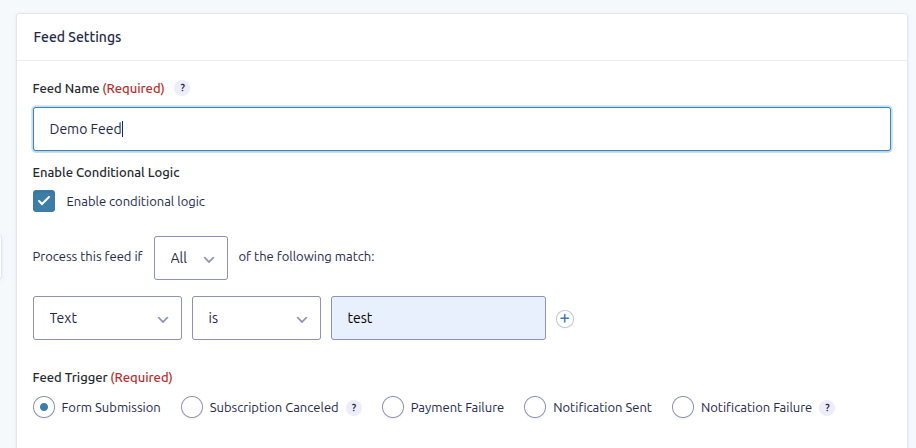
Feed Name #
- This is a label you assign to your feed so you can easily identify it in your list of feeds.
- Choose something descriptive—e.g., “New Client Inquiry Task” or “Application → Onboarding Feed”.
- Only visible within your form settings; helps with organization, especially if you have multiple feeds.
Conditional Logic #
- Toggle on “Enable Conditional Logic” if you want this feed to run only under certain conditions.
- You can configure logic based on form fields (e.g., only create a task if “Priority” = “High”).
- Great for segmenting alerts/tasks, or for routing submissions differently.
- If disabled, the feed will run for every form submission.
Feed Trigger #
- Determines when the feed executes. Default (and only option on the free plan) is Form Submission.
- Choose the option that best matches how (and when) you want tasks to be created or updated.
- See here and here for more details.
Summary #
| Setting | Purpose |
|---|---|
| Feed Name | For identifying and organizing your feeds within a form. |
| Conditional Logic | Controls when the feed executes based on form field values. |
| Trigger | Defines the event or action that causes the feed to run (e.g., form submission). |


